
Smart Deadbolt Lock: The Complete 2026 Guide to Keyless Deadbolt Security

Imagine leaving your home knowing that your front door is not only locked but actively protected ??with tamper alerts sent straight to your phone, access codes shared with guests in seconds, and your family’s entry history logged in real time. That is not a scene from a sci-fi film. It is the everyday reality for thousands of homeowners who have upgraded to a smart deadbolt lock. Whether you are replacing a traditional keyed deadbolt for the first time or adding a layer of intelligence to your existing smart home ecosystem, this guide covers everything you need to know before you buy, install, and use one.
Traditional deadbolts have served us faithfully for over a century. But they have a fundamental weakness: a physical key that can be lost, duplicated, or forced. Smart deadbolt locks eliminate that single point of failure while adding layers of convenience and control that mechanical locks simply cannot match. In this comprehensive guide, we explore how smart deadbolt locks work, what features matter most, how to choose the right one for your door, and how to install one like a professional.
What Is a Smart Deadbolt Lock?
A smart deadbolt lock is an electronic replacement or companion to a standard deadbolt that allows you to lock and unlock your door without using a physical key. It connects to your smartphone, home network, or a compatible smart home hub, giving you remote access, automation capabilities, and real-time monitoring from anywhere in the world.
Unlike a standard deadbolt that requires a physical key to operate, a smart deadbolt typically supports multiple authentication methods: PIN codes entered on a built-in keypad, fingerprint recognition, Bluetooth proximity unlocking, Wi-Fi or Z-Wave remote access, voice assistant integration (Amazon Alexa, Google Assistant), and even NFC cards or fobs. Some models combine all of these, while others focus on a specific access method to keep things simple and affordable.
The core locking mechanism itself ??the deadbolt throw that extends into the door frame ??remains mechanically similar to a traditional deadbolt. The difference lies in how you control it and what data it generates. A smart deadbolt lock is, at its heart, a bridge between physical security and digital intelligence.
Why Homeowners Are Switching to Smart Deadbolt Locks
The shift toward smart deadbolt locks is being driven by three converging forces: the widespread adoption of smart home devices, growing awareness of home security vulnerabilities, and the desire for everyday convenience. Here are the primary benefits driving this adoption.
1. Keyless Convenience ??No More Hiding Spare Keys
The most immediate benefit of a smart deadbolt lock is the elimination of physical keys. Every year, millions of homeowners lock themselves out of their homes. Worse, spare keys hidden under doormats or in fake rocks are among the first things burglars check. With a keypad or fingerprint-enabled deadbolt, every family member, tenant, or guest can have their own unique code ??no spare key required. Codes can be created, shared, and revoked instantly through a smartphone app.
2. Remote Access and Control
Wi-Fi and Z-Wave smart deadbolt locks connect to your home network, allowing you to lock or unlock your door from anywhere using a smartphone app. Forgot to lock the door on your way to work? One tap in the app locks it immediately. Expecting a delivery person while you are on vacation? Unlock the door remotely to let them place a package inside, then lock up again. Some models even support auto-lock timers that engage the deadbolt automatically after a set period of inactivity.
3. Real-Time Activity Monitoring
Smart deadbolt locks maintain an access log that records every lock and unlock event, including the time and the specific code or credential used. Parents can see exactly when their teenagers arrived home from school. Airbnb hosts can verify that cleaners arrived on schedule. This audit trail is invaluable for both security monitoring and peace of mind.
4. Seamless Smart Home Integration
A smart deadbolt lock is rarely an isolated device. Most integrate with popular smart home ecosystems, allowing you to create powerful automations. For example, when your smart deadbolt locks at night, your smart lights can turn off automatically and your security camera can switch to away mode. When you unlock the door using your fingerprint, the hallway lights can turn on and your preferred music can start playing. These automations transform a simple lock into the nerve center of your home’s security system.
5. Guest Access Without Physical Copies
Rental property owners, Airbnb hosts, and parents with frequent visitors benefit enormously from temporary access codes. A code can be generated that is valid only during specific hours or on specific dates. Once expired, the code simply stops working ??no need to collect keys, no risk of unauthorized copies floating around.
How to Choose the Right Smart Deadbolt Lock for Your Door
Not all smart deadbolt locks are created equal, and the right choice depends heavily on your specific door, your existing smart home setup, and how you plan to use the lock. Here are the key factors to evaluate before making a purchase.
Door Compatibility
Before anything else, check whether the smart deadbolt lock you are considering is compatible with your door’s thickness and backset. Most residential deadbolts fit doors between 1-3/8 inches and 2 inches thick, with a standard 2-3/8-inch or 2-3/4-inch backset. EZ Living Locks offers smart deadbolt models designed for both standard US residential doors and European-style doors, so verify the specifications before ordering. Additionally, check whether your door has a single cylinder (key cylinder on the outside, thumb turn on the inside) or a double cylinder (key cylinder on both sides) configuration ??most smart deadbolt replacements use a single cylinder design.
Connectivity Protocol: Wi-Fi vs. Bluetooth vs. Z-Wave
This is one of the most important technical decisions you will make. Each connectivity protocol has distinct advantages and trade-offs.
- Bluetooth: Low power consumption and reliable auto-unlock when your phone approaches. However, Bluetooth locks typically cannot be controlled remotely unless you are within Bluetooth range (about 30 feet). Best for users who primarily want keyless entry and are comfortable not having remote access.
- Wi-Fi: Direct remote access from anywhere with an internet connection. Wi-Fi locks consume more power, so battery life is typically shorter (3-6 months vs. 6-12 months for Bluetooth). Some models use a Wi-Fi bridge or hub to reduce power draw while maintaining connectivity.
- Z-Wave / Zigbee: These mesh networking protocols are popular in professional and enthusiast smart home setups. They require a compatible hub (such as SmartThings, Hubitat, or Ring Alarm) but offer excellent range, low power consumption, and local control without cloud dependency.
For most homeowners, a Wi-Fi or Bluetooth dual-protocol smart deadbolt lock offers the best balance of features and convenience, providing both local auto-unlock via Bluetooth and remote access via Wi-Fi.
Authentication Methods
Consider which access methods you actually need. A lock with a fingerprint reader, keypad, NFC card, and Bluetooth may seem impressive but adds cost and complexity. A simple keypad-and-Bluetooth model may be all you need for everyday use. Think about who will use the lock: elderly family members may prefer a straightforward keypad, while tech-savvy users may want the speed of fingerprint recognition.
Power Source and Battery Life
Almost all smart deadbolt locks run on AA batteries. Look for models that offer at least 6 months of battery life under normal use. Some premium models include low-battery warnings via app notifications and even an emergency micro-USB or 9V battery terminal on the exterior keypad for temporary power if the batteries die. Avoid models that require hardwiring unless you are already set up for it.
ANSI/BHMA Grade
Look for a smart deadbolt lock that meets ANSI/BHMA Grade 2 or Grade 1 certification, which indicates the lock has passed rigorous durability and security testing. Grade 1 is the highest residential rating and is recommended for front door applications where security is paramount.
Top Features to Look for in a Smart Deadbolt Lock
As you compare models, keep an eye out for these high-value features that separate a good smart deadbolt from a great one.
Auto-Lock and Auto-Unlock
Auto-lock automatically engages the deadbolt after a preset period (typically 30, 60, or 120 seconds) once the door is closed. This is a must-have for anyone who has ever driven away only to wonder if they remembered to lock up. Auto-unlock uses Bluetooth or geofencing to detect when you approach your home and automatically unlocks the door ??so your hands can stay full and your keys stay in your pocket.
Biometric Fingerprint Recognition
Fingerprint sensors on smart deadbolt locks have become fast and reliable enough to serve as a primary access method. A good optical or capacitive fingerprint sensor can verify a print in under 0.5 seconds and store 50-100 fingerprints locally. This is ideal for households where multiple family members need quick, keyless access without having to remember a code.
Anti-Peep Keypad Security
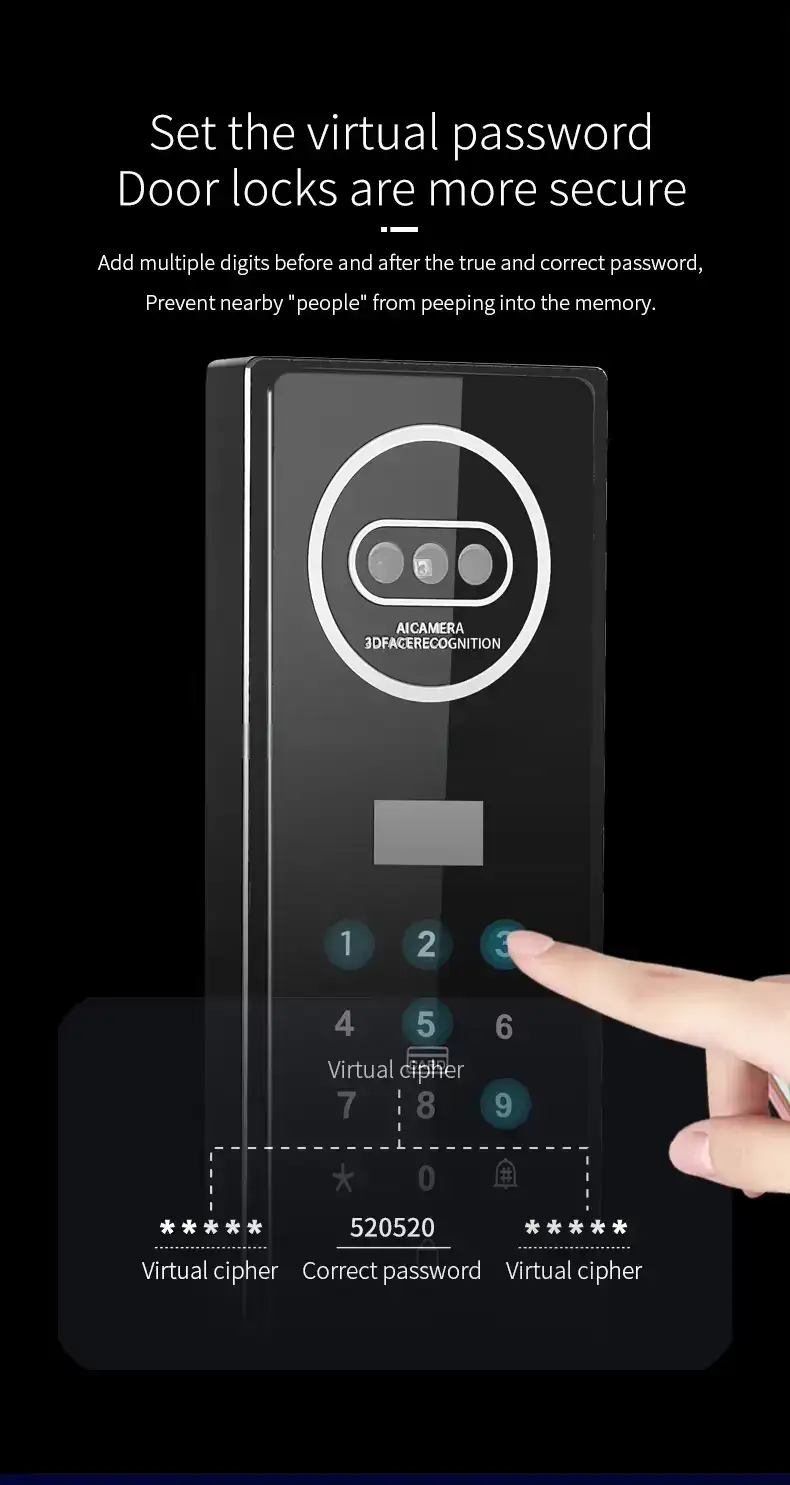
Also known as “randomized PIN security,” this feature displays two random digits before you enter your PIN. You must enter your full PIN using those digits plus your actual code. This prevents onlookers from identifying your PIN by watching the wear patterns on the keypad buttons or by memorizing which keys you press. It is a simple but powerful security enhancement that is increasingly common on quality smart deadbolt locks.
Tamper Alerts and Forced Entry Notifications
Premium smart deadbolt locks include sensors that detect unusual vibrations, forced rotation of the interior thumb turn, or repeated failed PIN attempts. When triggered, the lock can sound a local alarm, send a push notification to your phone, or alert your connected security system.
Voice Assistant Compatibility
Integration with Amazon Alexa, Google Assistant, or Apple HomeKit allows you to lock your door using voice commands. While voice control should not be your only way to lock the door (always have a physical backup), it is a convenient addition for hands-free moments and smart home routines.
Physical Key Backup
Even in the most advanced smart lock, a physical key override is essential. Dead batteries, electronics failures, or system glitches can happen at the worst possible moment. A properly designed smart deadbolt lock includes a concealed keyhole on the exterior that operates the deadbolt using a standard spare key ??the same way your traditional deadbolt works.
How to Install a Smart Deadbolt Lock: A Step-by-Step Guide
One of the great advantages of a smart deadbolt lock is that most models are designed for do-it-yourself installation in 20-30 minutes, using only a screwdriver. Here is how to do it right.
Tools You Will Need
- A Phillips head screwdriver (#2 size)
- A flathead screwdriver (for some interior escutcheon screws)
- A tape measure (to verify door thickness)
- The smart deadbolt lock kit (check all components are present)
- 4 AA alkaline batteries (pre-installed in some models)
Step 1: Remove the Existing Deadbolt
Start by removing your current deadbolt. Unscrew the two interior mounting screws (visible on the inside plate) and pull the interior assembly away from the door. Then remove the exterior cylinder by pulling it straight out. Finally, remove the deadbolt latch from the edge of the door by unscrewing its face plate screws. Clean any debris or old lubricant from the latch hole.
Step 2: Check Door Dimensions
Measure your door thickness (standard is 1-3/8″ to 2″) and the backset distance (the depth from the door edge to the center of the bore hole ??typically 2-3/8″ or 2-3/4″). Most smart deadbolt locks include adjustable mounting hardware to accommodate these variations, but confirming before you begin saves frustration later.
Step 3: Install the New Latch
Insert the new deadbolt latch into the door edge. The tapered side of the latch should face the direction the door closes toward. Secure it with the latch faceplate screws. Ensure the deadbolt mechanism moves smoothly in and out without binding.
Step 4: Install the Exterior Keypad Unit
Insert the exterior smart deadbolt assembly through the front of the door, threading the connecting cable (or tailpiece) through the latch mechanism. The cable should protrude through the interior bore hole on the door. On some models, a tailpiece from the exterior keypad goes through the latch first ??follow your manufacturer’s specific instructions.
Step 5: Install the Interior Assembly
Connect the cable from the exterior keypad to the interior assembly’s connector. Carefully align the interior mounting plate over the door bore and secure it with the provided screws. Do not overtighten ??the mounting plate should be snug but not bowing. Attach the interior thumb turn and keypad housing, securing all visible screws.
Step 6: Insert Batteries and Power Up
Insert 4 fresh AA batteries into the battery compartment on the interior assembly. The lock will typically perform a self-calibration cycle, automatically testing the deadbolt throw. Watch and listen ??the deadbolt should extend and retract smoothly. If it hesitates or binds, remove the batteries and check that everything is properly aligned before proceeding.
Step 7: Connect to the App and Configure
Download the manufacturer’s app (EZ Living Locks uses TUYA or TTLock depending on the model ??check your product documentation). Create an account, add your lock, and follow the pairing instructions to connect it to your Wi-Fi or Bluetooth network. Once paired, set up your master PIN code, enroll fingerprints, and configure settings such as auto-lock delay, sound volume, and notification preferences.
Step 8: Test Everything
Before you finish, test every access method: keypad PIN, fingerprint (if equipped), app lock/unlock, physical key backup, and auto-lock. Verify that the app’s activity log is recording events correctly. Test the auto-lock feature by opening the door and waiting for the configured delay to confirm the deadbolt engages automatically. Finally, test the physical key to ensure it operates the lock even with batteries removed.
Common Questions About Smart Deadbolt Locks
Can a smart deadbolt lock be hacked?
Any internet-connected device has some attack surface, but reputable smart deadbolt manufacturers use bank-level AES-256 encryption, secure cloud servers, and regular firmware updates to minimize risk. Practical tips: use a strong, unique Wi-Fi password, enable two-factor authentication on the app if available, and choose locks from established brands with a track record of security updates. The security benefits of activity logs, remote lock capability, and unique PINs far outweigh the theoretical risks.
What happens when the batteries die?
Quality smart deadbolt locks provide multiple layers of protection against lockouts from dead batteries. First, a low-battery warning is sent via the app well before the batteries are actually depleted (often weeks in advance). Second, most models have a micro-USB emergency power port on the exterior keypad ??you can connect a portable power bank for temporary power to enter your code. Third, every smart deadbolt lock has a physical key override that works without any battery power at all.
Will a smart deadbolt lock work if my internet goes down?
Yes. Smart deadbolt locks do not require an active internet connection for local operation. Bluetooth unlocking works without the internet, and the keypad and fingerprint sensor operate entirely locally. Only remote access and app notifications require an internet connection. Your physical key always works as a completely offline backup.
Can I install a smart deadbolt lock on a rental property?
Absolutely ??and it is one of the most popular use cases. Smart deadbolt locks are ideal for rental properties, Airbnb listings, and investment properties because you can issue temporary access codes to tenants and guests that expire automatically. When a tenant moves out, you simply delete their code ??no rekeying required. Many property management platforms integrate directly with smart lock APIs for seamless automation.
How much does a smart deadbolt lock cost?
Prices range from approximately $80 for a basic Bluetooth keypad model to over $300 for a premium Wi-Fi + fingerprint + camera door lock combination. For most homeowners, a mid-range model in the $120-200 range offers the best combination of features, build quality, and security certification. Budget models under $80 may lack ANSI/BHMA certification and may have shorter battery life or less reliable software.
Conclusion: Is a Smart Deadbolt Lock Right for You?
A smart deadbolt lock is one of the highest-impact upgrades you can make to your home security system. It eliminates the vulnerabilities of physical keys, adds powerful monitoring and automation capabilities, and integrates seamlessly with the smart home ecosystem you already use or plan to build.
Whether you are a homeowner looking to upgrade your front door, a landlord tired of managing spare keys and rekeying costs, or an Airbnb host who needs to manage guest access at scale, a smart deadbolt lock delivers tangible benefits that pay for themselves within months. The convenience of walking up to your door with groceries in both hands and having it unlock automatically, the peace of mind from receiving a tamper alert while you are at work, and the control of granting a one-time access code to a delivery person ??these are not luxuries. They are the new standard for modern home security.
Browse EZ Living Locks’ full range of smart deadbolt locks today and find the perfect model for your door, your lifestyle, and your security needs.